How could I get alarms when my data is low?

Hi, I use bixi a lot and it has happened to me that I was left in the middle of nowhere, unable to scan a bar, because I ran out of data. I wish Fizz could tell me when it's low! Are there any options?
Best Answer
-
Login to your account, go to Settings -> Communication preferences -> select your plan -> Usage alerts -> select Email or Text and check 75% and/or 90%
0

Answers
-
Hi, you can set your smartphone to notify when an amount, it's usually in settings > Network> Data settings but you can look up your device and OS online for specific instructions
0 -
Hi @Stephania D.
Fizzers gave you the clue you seek. But I would add that you should also consider the option to put money in your Wallet (a security option)
https://fizz.ca/en/faq/what-is-my-wallet-and-how-do-i-use-it
Also, you can always check your usage on your account and ask for datas if you are low. Fizzers on the Forum are generous. To ask datas you must use the good section on the Forum
English : https://forum.fizz.ca/en/post/discussion/data-gifting
French : https://forum.fizz.ca/fr/post/discussion/Partage-de-données
Finally, don't forget to check your Perks on your account. Then you could activate the Fizz's gifts. Often free datas they offer from time to time.
Welcome in the Fizz Community0 -
Hello @Stephania D. ,
I hope my message finds you well.
All the information was already provided by @Andrei_ref_R7VK1 and @Use_code_VGTIB . As specified, you can also set a certain amount from your phone's settings, so you can get notified when reached.
Last but not least, if you run out of data, you can always ask our users to share some with you, as @SuperFrizz 5CQ2W informed you.
I wish you a great day!
-Alexandru, Community Moderator0 -
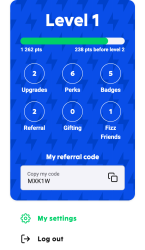
In you account scroll down the left side bar and select settings (Step 1), then on My Settings page, scroll down to communication and select Plan Communications (Step 2), look left and there is an option for text or email alert system for data usage reaching 75%, 90% and 100% is defaulted to on:
Step 1, select my settings (just above logout command)
Step 2, scroll to bottom of settings page and alter Plan Communications
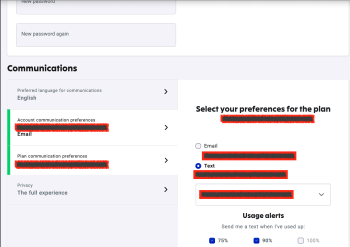
Hope you understand me redacting my personal info .
.
Best,
-Peter0




