RCS not working on Moto G Play 2024.

Answers
-
Hello RockysFizz,
Thank you for reaching out to us.
I'm sorry to hear you're having issues with RCS messaging.
To help resolve the problem, please try the following troubleshooting steps:
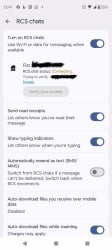
- Make sure RCS Chat features are enabled in your messaging app.
- Verify that your device has an active mobile data or Wi-Fi connection.
- Confirm that your phone number is correctly registered for RCS.
- Update your Messages app and Carrier Services app (if applicable) to the latest version available.
- Turn RCS Chat features off, wait a few minutes, and then turn them back on.
- Restart your device after making the changes.
- If you recently transferred your number from another provider, the RCS activation process may take some additional time to complete.
Also, please make sure that the phone is updated. You can verify this in the phone's Settings.
I wish you a great day!-Peter, Community Moderator
0 -
I have tried all of that but it might have something to do with the recent update, as after I transferred the SIM card into my iPhone to get Wi-Fi Calling enabled on my Moto G Play 2024, and although I did update and enable Carrier Services, nothing is working, and I did still disable iMessage and RCS on the iPhone
0 -
Hello RockysFizz,
Thank you for the fast response.
Given this situation, I kindly ask you to contact us on chat so we can verify this aspect in detail. You can use this link to contact us: How to contact Fizz and get help. | Fizz
Thank you so much for your kind understanding.
Have a great day!-Peter, Community Moderator
0
