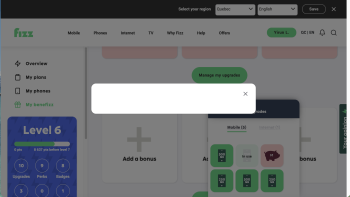
webpage of my reward question

Answers
-
Hi use browser with private mode.
0 -
Hello,
Safari (iPhone/iPad): Open the Settings app > Apps > Safari > Clear History and Website Data. [1, 2, 3]
Thanks for sharing.
Please be sure to delete your browser history together with the cache memory and cookies before you try again.
To clear your browsing history, press Ctrl + Shift + Delete (Windows) or Cmd + Shift + Delete (Mac) on almost any desktop browser. This instantly opens the deletion menu.
Chrome (iOS/Android): Tap the three dots (or the menu icon) > Settings > Privacy and security > Delete browsing data.
Also, you can try to do so from Incognito mode or a different browser or device.
Turning on Incognito mode (or private browsing) allows you to browse the web without saving your history or cookies. Here is how to activate it quickly across different devices and browsers:- Google Chrome: Click the three dots in the top right corner and select New Incognito Window. Alternatively, press
Ctrl + Shift + N(Windows) orCmd + Shift + N. - Safari (Mac): Go to the File menu and click New Private Window.
On a Smartphone (Android, iPhone, iPad)
- Google Chrome: Open the Chrome app, tap the three dots in the top right or bottom right corner, and select New Incognito Tab.
- Safari (iPhone/iPad): Tap the Tabs icon (two overlapping squares) in the bottom right corner. Swipe over to select Private, then tap the + sign.
Have a good one!
-Andrei, Community Moderator0 - Google Chrome: Click the three dots in the top right corner and select New Incognito Window. Alternatively, press