Is it possible to use keyword filters in this situation?

I set out to try to block specific websites on a specific schedule for all devices connected to my network.
After some looking around, I found a [user's manual](https://www.cogeco.ca/sites/default/files/guides/user-guide-hitron-coda4589.pdf) for Hitron CODA-4x8x boxes. I ended up logging onto the portal located at `192.168.0.1` with the username stickered on the back of my Hitron Fizz box and my network's password.
According to the "Status/Overview" tab of the portal,
my Hitron box model is `CODA-4680-FIZ (2A)`,
my Hitron box model name is `CODA-4680-FIZ`,
and my Hitron box software version is `7.3.5.1.2b21`.
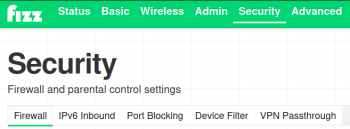
According to the manual, what I want to do can be done in a "Security/Keyword Filter" tab of the portal. But the portal I logged onto has no such tab... (See the screenshot below.)
**Is it possible to use keyword filters in this situation?**
**More importantly, is it possible to block specific websites on a specific schedule for all devices connected to my network? (For free?)**
After some looking around, I found a [user's manual](https://www.cogeco.ca/sites/default/files/guides/user-guide-hitron-coda4589.pdf) for Hitron CODA-4x8x boxes. I ended up logging onto the portal located at `192.168.0.1` with the username stickered on the back of my Hitron Fizz box and my network's password.
According to the "Status/Overview" tab of the portal,
my Hitron box model is `CODA-4680-FIZ (2A)`,
my Hitron box model name is `CODA-4680-FIZ`,
and my Hitron box software version is `7.3.5.1.2b21`.
According to the manual, what I want to do can be done in a "Security/Keyword Filter" tab of the portal. But the portal I logged onto has no such tab... (See the screenshot below.)
**Is it possible to use keyword filters in this situation?**
**More importantly, is it possible to block specific websites on a specific schedule for all devices connected to my network? (For free?)**

0
Best Answer
-
I don't have first hand experience with that, but I've seen other users on forum ask about the same feature and those discussions concluded with no built in option to do so, seems you'll need to use 3rd party tools to achieve a working keyword filter.
0

