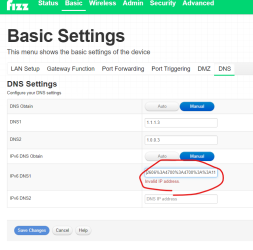
Cannot save DNS IPv6 address

I want to set my DNS to Cloudflare (for families), ie.
1.1.1.3
1.0.0.3
2606:4700:4700::1113
2606:4700:4700::1003
Upon save, the Fizz modem is mangling the IPv6 address.
It's a CODA-4680-FIZ version 7.3.5.1.2b21
This was working fine a few weeks ago.
Help?
Answers
-
I don't know why, I have exactly the same problem
0 -
Hmm weird, as the last resort try to reset your modem to the factory settings and try again.
0 -
@Andrei_ref_R7VK1 said:
Hmm weird, as the last resort try to reset your modem to the factory settings and try again.That doesn't change anything, I reset the modem
0 -
@Bois_3ISKD said:
@Andrei_ref_R7VK1 said:
Hmm weird, as the last resort try to reset your modem to the factory settings and try again.That doesn't change anything, I reset the modem
Very weird behavior
0 -
@Andrei_ref_R7VK1 said:
@Bois_3ISKD said:
@Andrei_ref_R7VK1 said:
Hmm weird, as the last resort try to reset your modem to the factory settings and try again.That doesn't change anything, I reset the modem
Very weird behavior
Yes, indeed.
0 -
Contact support for this bug, probably bad update..
-1 -
I have the same problem
0 -
Did you upgrade the firmware to the latest?
0 -
@junozero said:
Did you upgrade the firmware to the latest?Shouldn't Fizz be the ones updating their modem ?
0 -
@Dac C. said:
I want to set my DNS to Cloudflare (for families), ie.1.1.1.3 1.0.0.3 2606:4700:4700::1113 2606:4700:4700::1003
Upon save, the Fizz modem is mangling the IPv6 address.
It's a CODA-4680-FIZ version 7.3.5.1.2b21
This was working fine a few weeks ago.
Help?
I have the new modem CODA5610Q, it's on 7.3.5.1.2b22 firmware version and DNS IPv6 are saved successfully.
0 -
@Bois_3ISKD said:
@junozero said:
Did you upgrade the firmware to the latest?Shouldn't Fizz be the ones updating their modem ?
Yes, sometimes you just need to reboot it to have the latest firmware installed.
1 -
@Andrei_ref_R7VK1 said:
@Bois_3ISKD said:
@junozero said:
Did you upgrade the firmware to the latest?Shouldn't Fizz be the ones updating their modem ?
Yes, sometimes you just need to reboot it to have the latest firmware installed.
Okay, thank you, I'll restart it.
0 -
@Bois_3ISKD said:
@junozero said:
Did you upgrade the firmware to the latest?Shouldn't Fizz be the ones updating their modem ?
Check if you can upgrade to 7.3.5.1.2b22 firmware version.
0 -
I rebooted.
Still at version CODA-4680-FIZ (2A) 7.3.5.1.2b21
Still the same problem.
0 -
Contacted support.
They told me to set it at the device level. Very generic advice.
Did not acknowledge this was a bug.
Oh well. 🤷
1 -
@Dac C. said:
Contacted support.They told me to set it at the device level. Very generic advice.
Did not acknowledge this was a bug.
Oh well. 🤷
Unfortunately, it's very difficult to make oneself understood by the support team.
0 -
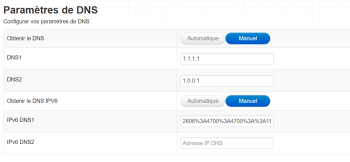
I have the very same problem with CODA5610Q version 7.3.5.1.2b22.
 0
0 -
I just contacted the technical support and they told me it is a known bug. They are working on a fix.
0 -
@GrifOli said:
I have the very same problem with CODA5610Q version 7.3.5.1.2b22.I have no issues on CODA5610Q
0 -
Here too I have a variant of the problem. I changed the DNS servers IPv4 & IPv6 to Quad9 DNS servers. All is well for the IPv4 but the secondary DNS in IPv6 does not bind. It doesn't really matter to me because IPv4 still works. Also: in the Overview window, the WAN DNS IP still shows the old IP's for both v4 & v6. However the Quad9 test page does show that my DNS is Quad9. I read in an earlier post that it's a bug that Fizz is working on fixing. Also, thCODA-4680 is really really really slow to reboot. Anyone knnow why that is?
0 -
I bet you already know, but just in case...
This very frustrating situation that can be avoided by using your own router. I've set my modem to bridge mode and purshased a seperate Ubiquity router.
It costs me some money, but at least I can reach out to Ubiquity's technical support if there's an issue and I know they'll work on it because it's their core business to make their devices working properly.
1 -
@Dac C. said:
I want to set my DNS to Cloudflare (for families), ie.1.1.1.3 1.0.0.3 2606:4700:4700::1113 2606:4700:4700::1003
Upon save, the Fizz modem is mangling the IPv6 address.
It's a CODA-4680-FIZ version 7.3.5.1.2b21
This was working fine a few weeks ago.
Help?
Hello 👋
Thanks for the detailed technical info, that really helps.
This looks very much like a known issue/bug in the CODA-4680-FIZ firmware rather than a configuration problem on your side. The fact that:
• IPv4 DNS saves correctly
• IPv6 DNS gets mangled on save
• and it worked fine a few weeks agostrongly suggests a recent firmware change affecting manual IPv6 DNS input.
A few important points and workarounds to consider:
What’s likely happening
• Firmware 7.3.5.1.2b21 appears to have a regression in the UI or backend validation for custom IPv6 DNS fields
• The modem either reformats or truncates the IPv6 addresses on save, making them invalid
• This impacts dual-stack setups using third-party DNS like Cloudflare FamiliesThings you can try (if not already done)
• Enter only IPv4 DNS (1.1.1.3 / 1.0.0.3) and leave IPv6 DNS blank — many setups will still work fine
• Put the modem in bridge mode and set DNS directly on:
• your own router (recommended), or
• individual devices (less ideal, as you noted)
• Factory reset the modem once (just to rule out corrupted config), but chances are low this will fix itImportant note
Fizz does not allow manual firmware rollback, and firmware updates are pushed automatically. If this was working before and broke recently, it’s something Fizz needs to fix on their side.
👉 Best next step:
Contact Fizz support and report it as:
• IPv6 DNS manual configuration broken on CODA-4680-FIZ
• Firmware version: 7.3.5.1.2b21
• Reproducible with Cloudflare IPv6 DNS (2606:4700:4700::1113 / ::1003)If other members with the same modem/firmware can confirm, that will help get it escalated faster.
You’re definitely not doing anything wrong here — this smells like a firmware regression. 👍
0 -
Mine updated after a factory reset.
0 -
@propea said:
@Dac C. said:
I want to set my DNS to Cloudflare (for families), ie.1.1.1.3 1.0.0.3 2606:4700:4700::1113 2606:4700:4700::1003
Upon save, the Fizz modem is mangling the IPv6 address.
It's a CODA-4680-FIZ version 7.3.5.1.2b21
This was working fine a few weeks ago.
Help?
Hello 👋
Thanks for the detailed technical info, that really helps.
This looks very much like a known issue/bug in the CODA-4680-FIZ firmware rather than a configuration problem on your side. The fact that:
• IPv4 DNS saves correctly
• IPv6 DNS gets mangled on save
• and it worked fine a few weeks agostrongly suggests a recent firmware change affecting manual IPv6 DNS input.
A few important points and workarounds to consider:
What’s likely happening
• Firmware 7.3.5.1.2b21 appears to have a regression in the UI or backend validation for custom IPv6 DNS fields
• The modem either reformats or truncates the IPv6 addresses on save, making them invalid
• This impacts dual-stack setups using third-party DNS like Cloudflare FamiliesThings you can try (if not already done)
• Enter only IPv4 DNS (1.1.1.3 / 1.0.0.3) and leave IPv6 DNS blank — many setups will still work fine
• Put the modem in bridge mode and set DNS directly on:
• your own router (recommended), or
• individual devices (less ideal, as you noted)
• Factory reset the modem once (just to rule out corrupted config), but chances are low this will fix itImportant note
Fizz does not allow manual firmware rollback, and firmware updates are pushed automatically. If this was working before and broke recently, it’s something Fizz needs to fix on their side.
👉 Best next step:
Contact Fizz support and report it as:
• IPv6 DNS manual configuration broken on CODA-4680-FIZ
• Firmware version: 7.3.5.1.2b21
• Reproducible with Cloudflare IPv6 DNS (2606:4700:4700::1113 / ::1003)If other members with the same modem/firmware can confirm, that will help get it escalated faster.
You’re definitely not doing anything wrong here — this smells like a firmware regression. 👍
Good answer.
0